How to Check a Logo Before Vectorizing for Better Results Private
10 hours ago - BUSSINESS - Chicago - 10 views$ --
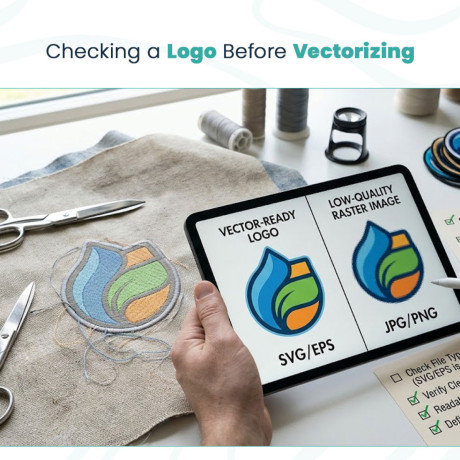
Checking a Logo Before Vectorizing
A logo may look perfectly clear on your computer screen, but that does not always mean it is ready for embroidery. The quality and structure of the original artwork can affect how easily a design can be prepared for stitching.
Before sending a logo for digitizing, it helps to check what type of file you have and whether the artwork can be edited without losing quality.
Start by Checking the File Type
The first step is to find out what format your logo uses. Common image files include:
JPG
PNG
GIF
SVG
EPS
AI
JPG and PNG files are raster images. They are made from pixels, so they can become blurry when enlarged. Vector formats use paths instead, which makes them easier to resize and edit.
If you are asking, is svg a vector format, the answer is yes. SVG stands for Scalable Vector Graphics and is a common vector format used for logos, illustrations, and other digital artwork.
Look Closely at the Logo
A vector-ready logo should have clean shapes and clear edges. Check whether the artwork contains:
Simple, defined shapes
Clean outlines
Separate design elements
Easy-to-identify colors
Text that is clearly readable
If the file is a low-quality image, you may need vector tracing to recreate the artwork as editable vector paths before moving forward.
Why This Matters for Embroidery?
Embroidery machines do not stitch a logo just because the artwork looks good on a screen. The design needs to be converted into an embroidery file with stitch types, density, underlay, and other settings.
A clean original logo gives the digitizer a better starting point. It also makes it easier to understand the shapes and details that need to be recreated with thread.
Check Before You Send the File
Taking a few minutes to inspect your logo can prevent unnecessary delays. If you only have a small JPG or blurry PNG, tell the digitizer before the project begins.
A vector-ready logo is not automatically an embroidery-ready design, but having clean artwork can make the digitizing process much smoother. The better the starting file, the easier it is to create a clean embroidery result.